
I originally built Oracle APEX AI Ticketing as a small playground application. It had a few tables, an APEX interface and some PL/SQL.
The interesting part started when I wanted to access the same application from outside APEX.
My longer-term goal is to let an AI client work with the ticketing system, but before doing that I needed a proper API. I did not want the AI part to become an excuse for exposing database tables directly or putting all the logic into REST handlers.
So I used ORDS to build a small REST layer around the application.
Client
   ↓
OAuth 2.0
   ↓
Oracle REST Data Services
   ↓
PL/SQL / Oracle Database
   ↓
Oracle APEX
The first version could have been as simple as a few endpoints returning JSON. That would work, but it would leave several important questions unanswered.
Who is allowed to call the API? Which operations should be exposed? What happens when a request fails? And if something changes a ticket, can I later see exactly what happened?
That is what I focused on while building the API.
I ended up with an ORDS API secured with OAuth 2.0 Client Credentials and a separate API log that records requests and their results.
It is still a small project, but the API now feels like something I could comfortably integrate with another application or eventually connect to an AI agent.
Contents
- Starting with the APEX application
- Defining the REST API
- Reading tickets through ORDS
- Creating tickets through ORDS
- Updating an existing ticket
- Adding API logging
- Monitoring the API directly from APEX
- Securing ORDS with OAuth 2.0
- Registering the OAuth client
- Getting an access token
- What started as an APEX form now has an API
- What comes next: letting AI use the API
Starting with the APEX application
The application uses a straightforward ticket model.
Each ticket contains the usual information:
Title
Description
Status
Priority
Created At
Created By
Updated At
Updated By
Inside APEX, users browse tickets through an Interactive Report and open a modal form to create or update them.
Status and priority are visually highlighted, so values such as:
OPEN          HIGH
IN_PROGRESS   CRITICAL
RESOLVED      LOW
can be recognized immediately without reading every column.
Nothing special so far.
The next step was to perform the same operations without opening APEX.
Defining the REST API
I created a custom ORDS module:
ai.ticketing.apiwith the base path:
/ai-ticketing/v1/The v1 is intentional.
APIs tend to survive longer than expected. Versioning the URI from the beginning gives me somewhere to put incompatible changes later without silently breaking existing clients.
The first version exposes four operations:
GET  /tickets/
GET  /tickets/:id
POST /tickets/
PUT  /tickets/:id
I kept the API small and exposed only the operations the application currently needs.
Reading tickets through ORDS
The collection endpoint starts with a simple query:
SELECT id,
       title,
       description,
       status,
       priority,
       created_at,
       created_by,
       updated_at,
       updated_by
  FROM ait_tickets
 ORDER BY created_at DESC
ORDS handles the JSON serialization.
A request to:
GET /ai-ticketing/v1/tickets/returns the same ticket data users see inside the APEX application, now available to an external client.
For an individual ticket, I created another template:
tickets/:idusing:
SELECT id,
       title,
       description,
       status,
       priority,
       created_at,
       created_by,
       updated_at,
       updated_by
  FROM ait_tickets
 WHERE id = :id
So:
GET /tickets/9returns one ticket.
At this point the API is read-only. The next step was to allow external clients to create and update tickets.
Creating tickets through ORDS
For POST, I used a PL/SQL handler and Oracle's native JSON_OBJECT_T to parse the request body.
A simplified version looks like this:
DECLARE
    l_body        CLOB;
    l_json        JSON_OBJECT_T;
    l_id          NUMBER;
    l_title       VARCHAR2(200);
    l_description CLOB;
    l_status      VARCHAR2(20);
    l_priority    VARCHAR2(20);
BEGIN
    l_body := :body_text;
    l_json := JSON_OBJECT_T.parse(l_body);

    l_title       := l_json.get_string('title');
    l_description := l_json.get_clob('description');

    IF l_json.has('status') THEN
        l_status := l_json.get_string('status');
    ELSE
        l_status := 'OPEN';
    END IF;

    IF l_json.has('priority') THEN
        l_priority := l_json.get_string('priority');
    ELSE
        l_priority := 'MEDIUM';
    END IF;

    INSERT INTO ait_tickets (
        title,
        description,
        status,
        priority,
        created_by
    )
    VALUES (
        l_title,
        l_description,
        l_status,
        l_priority,
        'REST_API'
    )
    RETURNING id INTO l_id;

    COMMIT;

    :forward_location := './' || l_id;
    :status_code := 201;
END;
One ORDS feature I particularly like here is :forward_location.
After creating the ticket, I do not have to write another block of PL/SQL just to rebuild the new object as JSON. Instead:
:forward_location := './' || l_id;tells ORDS to delegate the response to the existing GET resource for that ticket. ORDS also includes the fully resolved resource URL in the Location response header.
The client therefore gets:
201 Createdtogether with the representation of the newly created resource.
It is a small detail, but a useful one: the API has one canonical representation of a ticket instead of implementing the same serialization twice.
Updating an existing ticket
For updates, the current version uses:
PUT /tickets/:idThe handler first loads the existing ticket and changes only attributes present in the incoming JSON.
For example:
{
  "status": "IN_PROGRESS",
  "priority": "CRITICAL"
}
changes those two values while leaving the rest untouched.
It also records:
updated_at = SYSTIMESTAMP,
updated_by = 'REST_API'
One detail I would change in a future version is the use of PUT. because this behaves as a partial update, PATCH would be the more precise semantic choice. I kept PUT in the first version because that is how the current API was implemented, but it is something I would tighten as the contract evolves.
The endpoint responds with:
204 No ContentThe request succeeded, the resource changed, and the client does not necessarily need another copy of the object immediately.
A subsequent:
GET /tickets/9shows the changed values together with the REST audit information.
Adding API logging
Once external systems can modify application data, I want to know what they actually did.
A successful HTTP status is useful. A history of requests is much more useful.
So I added another table:
AIT_API_LOGIt records information such as:
Request Method
Endpoint
Request Body
Response Body
Response Status
Execution Time
Caller
Created At
The logging itself is handled through a small PL/SQL package.
I used an autonomous transaction for the logging procedure.
PROCEDURE write_log (...) IS
    PRAGMA AUTONOMOUS_TRANSACTION;
BEGIN
    INSERT INTO ait_api_log (...)
    VALUES (...);

    COMMIT;
EXCEPTION
    WHEN OTHERS THEN
        ROLLBACK;
END;
That separates the audit entry from the main business transaction. An API request can therefore leave an audit trail even when the surrounding business transaction does not commit.
The handler can then call something like:
ait_api_log_pkg.write_log(
    p_request_method  => 'POST',
    p_endpoint        => '/tickets/',
    p_response_status => 201,
    p_request_body    => l_body,
    p_caller          => :current_user
);
Using ORDS :current_user becomes especially useful once authentication is enabled because the audit can record the authenticated caller instead of a generic hard-coded value.
In practice, the API log became very useful while testing and debugging the endpoints.
Monitoring the API directly from APEX
Since the logs already live in Oracle, exposing them inside APEX was an obvious next step.
The application now has an API Logs page showing:
Method | Endpoint | Status | Execution | Caller | Created AtHTTP methods and response statuses are visually differentiated using Universal Theme components.
Opening a log entry shows the complete request payload:
{
  "status": "IN_PROGRESS",
  "priority": "HIGH"
}
and, where applicable, the response.
APEX was no longer only the UI where users worked with tickets. It also became the place where I could observe how machines were interacting with those tickets.
APEX now gives me one place to inspect both the ticket data and the requests coming through the API.
Securing the API
At this stage I could create tickets from Postman.
I could update them. I could inspect every request from APEX.
Technically, the API worked.
And technically, anyone who knew the URL could do the same thing.
Without authentication, nothing prevented somebody from sending:
POST /tickets/or:
PUT /tickets/9Before connecting another application, especially an AI client, I wanted to make sure the API was properly secured.
Securing ORDS with OAuth 2.0
For this project I chose OAuth 2.0 Client Credentials.
It fits the use case because the future consumer is another application rather than a human signing into APEX.
The authorization model looks like this:
OAuth Client
      ↓
Access Token
      ↓
ORDS Privilege
      ↓
AI_TICKETING_API_ROLE
      ↓
ai.ticketing.api
I created an ORDS role:
AI_TICKETING_API_ROLEThen I created a privilege protecting the REST module and associated that privilege with the role.
I tested the protection by calling the endpoint without credentials.
Before protection:
GET /tickets/
→ 200 OK

After protection, without credentials:
GET /tickets/
→ 401 Unauthorized
That 401 was probably one of the most satisfying responses I got during the project.
Nothing was broken. The API was finally secure.
Registering the OAuth client
In ORDS 26.2 I registered the client using ORDS_SECURITY:
BEGIN
    ORDS_SECURITY.REGISTER_CLIENT(
        p_name          => 'AI_TICKETING_CLIENT',
        p_grant_type    => 'client_credentials',
        p_support_email => 'your-email@example.com',
        p_description   => 'OAuth client for the AI Ticketing REST API'
    );

    COMMIT;
END;
/
Then I assigned the application role:
BEGIN
    ORDS_SECURITY.GRANT_CLIENT_ROLE(
        p_client_name => 'AI_TICKETING_CLIENT',
        p_role_name   => 'AI_TICKETING_API_ROLE'
    );

    COMMIT;
END;
/
There is one important ORDS 26.2 detail here: registering the client does not create a client secret by default. The secret must be registered or rotated separately, or explicitly supplied with an overload that accepts it.
A generated secret can, for example, be registered through ORDS_SECURITY.REGISTER_CLIENT_SECRET. The returned secret then needs to be stored securely by the client because it may not be recoverable later.
One obvious but important rule:
Never put the client secret in Git.
The repository contains the setup instructions, not the real credentials.
Getting an access token
The client requests a token from:
/ords/ai_ticketing/oauth/tokenusing:
grant_type=client_credentialsand HTTP Basic authentication containing the Client ID and Client Secret.
ORDS returns a response similar to:
{
  "access_token": "...",
  "token_type": "bearer",
  "expires_in": 3600
}
The client can then call the API using:
Authorization: Bearer <ACCESS_TOKEN>Now the behavior is exactly what I wanted:
No token       → 401 Unauthorized
Valid token    → 200 OK
The same authorization rules protect the write endpoints as well.
Without a valid access token, knowing the endpoint URL is no longer enough to call the API.
What started as an APEX form now has an API
The architecture is still small enough to understand at a glance:
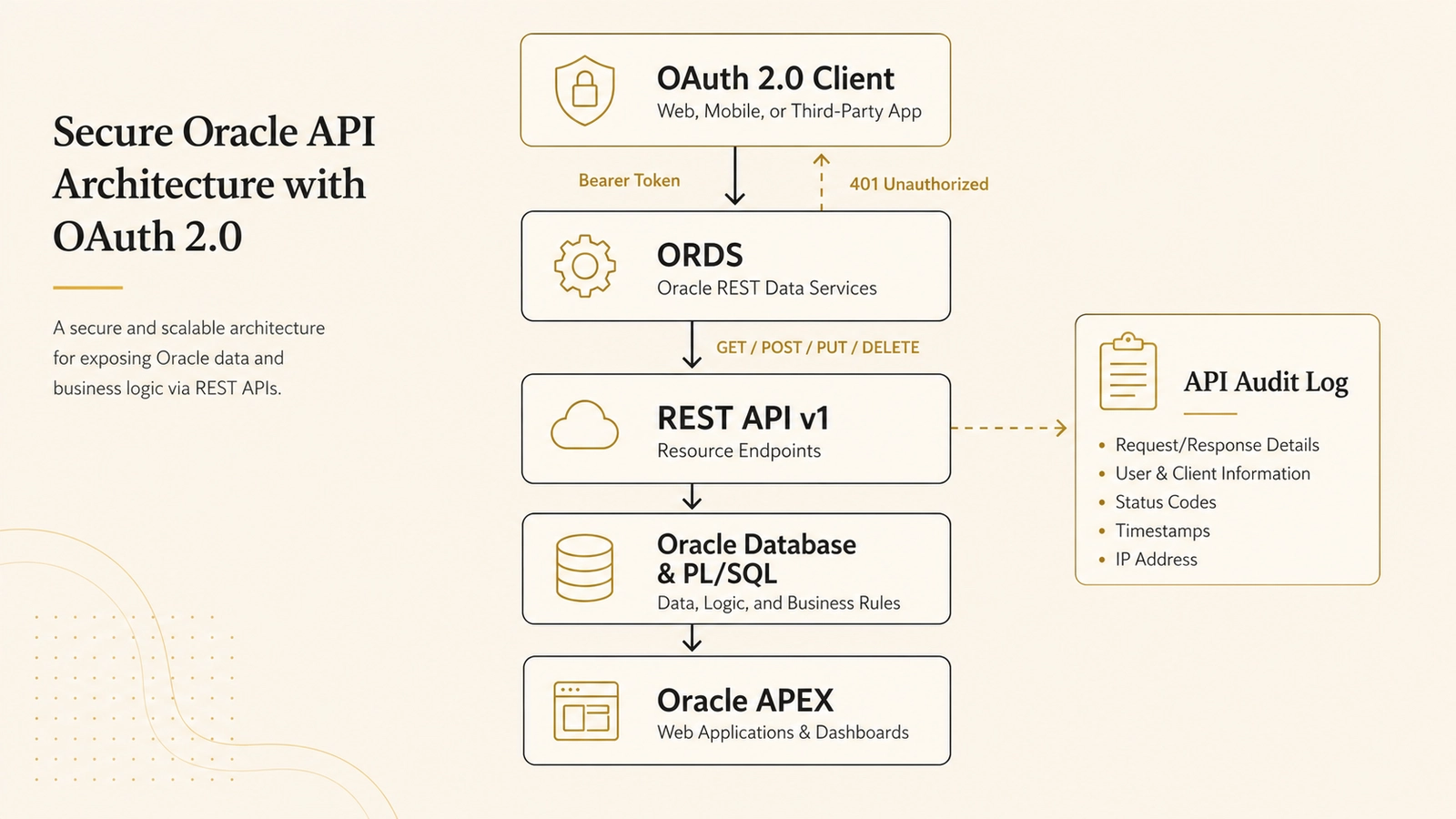
               ┌──────────────┐
               │ OAuth Client │
               └──────┬───────┘
                      │
                Bearer Token
                      │
                      ▼
              ┌─────────────┐
              │    ORDS     │
              │ REST API v1 │
              └──────┬───────┘
                     │
             GET / POST / PUT
                     │
                     ▼
             ┌───────────────┐
             │ Oracle DB     │
             │ AIT_TICKETS   │
             │ AIT_API_LOG   │
             └───────┬───────┘
                     │
                     ▼
              ┌────────────┐
              │ Oracle APEX│
              └────────────┘
There are still things I want to improve, especially validation, error responses and the current PUT implementation.
The responsibilities are now split clearly:
- APEX manages the application and gives users a productive UI.
- ORDS defines the external interface.
- OAuth 2.0 controls who can access the API.
- PL/SQL applies business logic and records what happened.
With that in place, I can move on to the AI integration.
What comes next: letting AI use the API
I did not build this API simply because I wanted to call Oracle from Postman.
I want to be able to write:
Show me all critical open tickets.
Or:
Create a high-priority ticket because the warehouse scanner stopped working.
And let an AI client call the appropriate API endpoint for me.
Not by connecting directly to the database or giving the model access to SQL, but through the same REST API that any other external application would use.
The next step is to describe the API with OpenAPI and connect it to an AI client while keeping authentication, validation and auditing in place.
I cover that step in Connecting a Custom GPT to Oracle APEX with ORDS.
Source code
The complete project includes the APEX export, database objects, PL/SQL logging package, ORDS module and OAuth setup documentation: