

Why Keep Wikipedia Offline?
Imagine you are travelling, staying somewhere with poor connectivity, or simply dealing with an internet outage. You want to look something up, but the connection is unavailable. Normally, that also means no Wikipedia.
An offline copy solves that problem. Instead of requesting each article from Wikipedia over the internet, the content is stored locally on your device. Once it has been downloaded, you can search and read it without relying on Wi-Fi, mobile data, or an external service.
That is where Kiwix comes in. It provides a practical way to download Wikipedia and other educational resources in advance and browse them later while completely offline.
How Kiwix Makes Wikipedia Available Offline
Kiwix is a free and open-source application designed for reading web content offline. It is available for Windows, macOS, Linux, Android, iOS, and as a Progressive Web App.
Instead of storing millions of individual web pages, Kiwix uses ZIM files. A ZIM file is a compressed archive containing a collection of web content such as Wikipedia. You download the archive once, open it in Kiwix, and browse the content locally.
In practice, this gives you a searchable Wikipedia library on your computer, phone, or tablet without requiring a live connection every time you want to read an article.
How to Download Wikipedia for Offline Use
-
Install Kiwix
- Visit the Kiwix website.
- Choose the version for your operating system or device.
- Install and open Kiwix.
-
Find a Wikipedia package
- Open the content catalog inside Kiwix.
- Search for Wikipedia and choose the language you want.
- Check the package type and download size before starting the download.
-
Download the ZIM file
- Start the download while you have a reliable internet connection.
- Larger Wikipedia archives can require a significant amount of storage, so make sure your device has enough free space.
-
Open Wikipedia in Kiwix
- Once the download is complete, open the archive in Kiwix.
- From that point on, the downloaded content can be browsed without an internet connection.
Choosing the Right Wikipedia Package
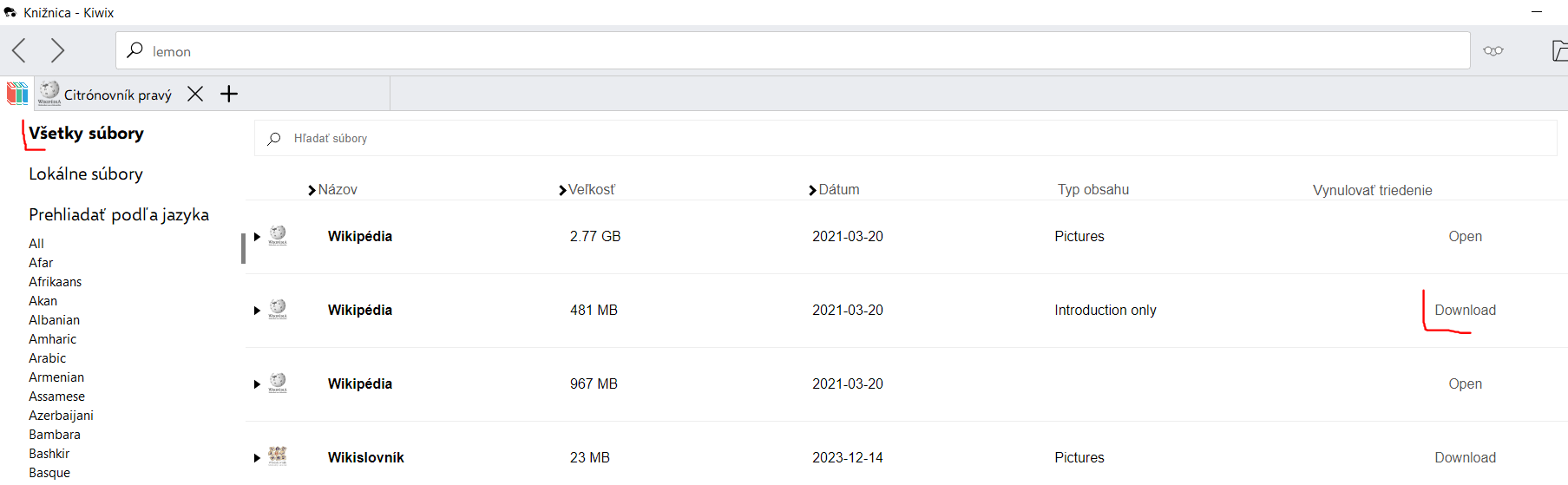
You do not necessarily need to download the largest possible Wikipedia archive. Kiwix provides different versions that trade content and images for storage space.
- mini: includes the introduction and infobox from each article. It is useful when storage space matters more than having complete articles.
- nopic: includes full articles but removes images, making the archive considerably smaller.
- maxi: the full version, including complete articles and images.
The best choice depends on your device and what you expect to use the offline copy for. On a laptop or desktop with plenty of storage, the full version may make sense. On a phone or small device, a reduced package can be much more practical.
Using Wikipedia Offline in Kiwix
Once the content is downloaded, using Kiwix feels much like browsing a local website. You can navigate between articles without waiting for pages to load from the internet.
Depending on the Kiwix client you use, useful features include:
- searching the downloaded content,
- opening and navigating between Wikipedia articles,
- using internal links between downloaded pages,
- bookmarking pages for easier access later.
The important difference is that all of this happens against the local ZIM archive rather than the live Wikipedia website.
When Offline Wikipedia Is Useful
Keeping Wikipedia offline is not something everyone needs every day, but there are several situations where it can be genuinely useful:
- Travel: look up information without relying on roaming, mobile data, or hotel Wi-Fi.
- Poor connectivity: keep a large reference source available in places where internet access is unreliable.
- Internet outages: retain access to general reference material even when your connection is down.
- Education: provide access to reference material on devices that are not permanently connected to the internet.
- Offline-first setups: keep useful information locally instead of depending entirely on cloud services.
Limitations and Trade-offs
Offline Wikipedia is useful, but it is not the same as having a live copy of Wikipedia.
- Storage requirements: larger Wikipedia archives can take up a substantial amount of disk space.
- The content is a snapshot: your downloaded archive does not automatically contain changes made to Wikipedia after that snapshot was created.
- Updates require another download: Kiwix does not currently support incremental updates for Wikipedia ZIM files, so updating your copy means downloading a newer archive.
- The initial download still requires internet access: offline access begins only after the content has been downloaded to your device.
For occasional use, these limitations may not matter. If you want a permanently current encyclopedia, the normal online version is obviously more convenient. If your priority is having a large body of reference material available independently of your connection, the trade-off makes much more sense.
Is Offline Wikipedia Worth It?
Offline Wikipedia is a simple idea: download the knowledge you may need before the internet disappears.
Kiwix makes that practical by packaging Wikipedia into downloadable ZIM archives that can be searched and read locally. It is particularly useful for travel, unreliable connections, offline-first devices, or simply keeping a substantial reference library under your own control.
You probably will not need it every day. But when you do find yourself without a connection and still want access to Wikipedia, having a local copy suddenly makes a lot of sense.